
Rev 32 Info Post
Introduction
Following a celebratory fireworks party beginning at 7PM EDT on Thursday, October 1st, Revision 31 will draw to a close. There will be a brief Chaos period as usual before that closes around 3PM EDT on Saturday Oct 3rd. We will launch Revision 32 on Saturday October 3rd around 4PM EDT on 26.2, time is tentative as we launch the new map!
Click here to see your local timings.
Time since revision launch
Theme
This revision's theme is Wizardry and Fantasy! With Rev 32, wander and wonder about the possibilities with vibrant locales, extraordinary views, and a magical home that may have surprises in store…
Please see the expandable sections below for more info!
Useful Links
Live Map
Nerd Wiki
Old Revision Downloads
Old Revision Carto Maps
Custom Currency Click to expand
Note: Custom currency is not purchasable using real money. It is earned in game or traded with other players ONLY. We are not 'pay to win' and do not have microtransactions. We instead rely on donations. If you wish to donate then please click here.
Nerd Aura
Every rev we choose a new name for our in-game currency to fit in with the theme. This time they are called Nerd Aura!
Nerd Aura can be used to purchase items from the traders at spawn such as:
- Disguise saddles
- Custom heads (from /headmart)
- Enchanted tools
- Enchanted armour
- Nether roof bedrock holes
- Nether portal shards (see overworld, nether, the end & mapworld section for further details)
- Hard to get blocks & items
- & more!
To obtain Nerd Aura you simply have to play the game! Breaking blocks & harvesting mobs has a random chance of dropping a Nerd Aura along with whatever drop you were expecting.
This is what a Nerd Aura looks like:

Note: Custom currency is not purchasable using real money. It is earned in game or traded with other players ONLY. We are not 'pay to win' and do not have microtransactions. We instead rely on donations. If you wish to donate then please click here.
Bot Usage Click to expand
We understand that many players enjoy the benefits of having a bot/alt account sit idly at a grinder while playing on their main account. We also, however, want to make it clear that our goal is to have a playable server the whole community can enjoy. Please do not use bots for at least the first month of the revision. Bots will be allowed starting Friday 6th November onwards.
Chunk loaders or "stasis chambers" also fall under the bot category as they serve the same function. These are subject to the same restrictions mentioned in this section.
Note:
The word bot is referring to a console client or script that automatically logs in/out of the server when it restarts. We do not allow bots to use chat, move, break/place blocks or use auto clickers. Accounts found to be breaking these rules will be banned.
PAdmins reserve the right to kick or ban bots (or idle players) found with built up mobs/items at any time necessary to improve server performance.
Note:
The word bot is referring to a console client or script that automatically logs in/out of the server when it restarts. We do not allow bots to use chat, move, break/place blocks or use auto clickers. Accounts found to be breaking these rules will be banned.
PAdmins reserve the right to kick or ban bots (or idle players) found with built up mobs/items at any time necessary to improve server performance.
Xraying Click to expand
Xray Policy
We have a zero tolerance policy on Xraying. Any players caught xraying will face a minimum 1 week ban, and further penalties such as having all edits rolled back & their inventories wiped will be at the discretion of the admin team. Players are cautioned in advance that their actions may affect their friends and town members if the loss of their edits means the loss of their builds.
Lava Xray
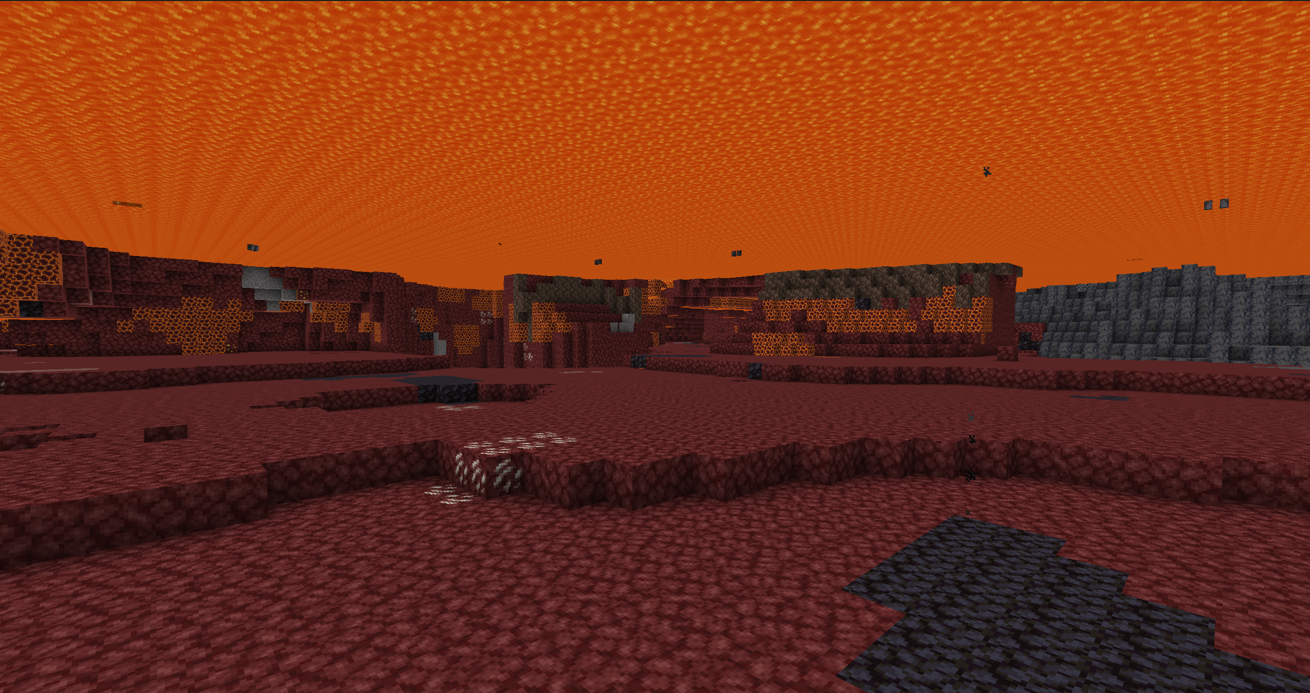
Using fire resistance potions and swimming through lava with the ability to see anything in front of you is also xraying. When under lava you should not be able to see clearly, as shown in the example images below;
You should see this when under lava.
 You should NOT see this.
Xray Policy
We have a zero tolerance policy on Xraying. Any players caught xraying will face a minimum 1 week ban, and further penalties such as having all edits rolled back & their inventories wiped will be at the discretion of the admin team. Players are cautioned in advance that their actions may affect their friends and town members if the loss of their edits means the loss of their builds.
Villagers Click to expand
To help mitigate server strain caused by villagers, this revision we will continue to offer perfect villagers. Perfect villagers have all possible trades for their profession. For this rev the max trade limit will remain at 1000 so your villager will need to be able restock from time to time. The idea is to only need 1 villager of certain professions per villager market. Make sure to keep your villager safe, as those killed by natural causes will not be replaced and will need to be repurchased.
To get a perfect villager you will need to train multiple villagers (trapped separately in enclosures so they can't move & ideally labelled with signs) to master level and a chest of emerald blocks nearby (the number of emerald blocks required varies for each type of villager. Please see below for the requirements of each type). When you have done this make a modreq that includes the location of where you would like the perfect villager placed and what biome style you would prefer. A padmin will collect the payment and place 1 perfect villager.
With the success of the perfect librarians from rev 31, they will make a return! All of the enchanted books have been distributed among 4 different types of librarian: Armourer, Melee, Ranged, and Tools. All types of librarian will sell bookshelfs, lanterns, glass & nametags along with their respective enchantment books. We will continue to offer enchanted books that cost 32 emeralds each based on player feedback. See the table below for full details.
Note: LIMIT 1 PERFECT VILLAGER OF EACH TYPE PER TOWN. Additional vanilla villagers should NOT be added to markets once a perfect villager is in place.
Perfect Villager
How to obtain
Trades
Librarian (Armourer)
- 6 master librarians each with
a unique trade from the list below:
- Aqua affinity
- Blast protection 4
- Curse of binding
- Depth strider 3
- Feather falling 4
- Fire protection 4
- Frost walker 2
- Projectile protection 4
- Protection 4
- Respiration 3
- Thorns 3
- 3 stacks of emerald blocks
- 9 emeralds → 1 Bookshelf
- 1 emerald → 1 Lantern
- 32 emeralds → Aqua affinity
- 32 emeralds → Blast protection 4
- 32 emeralds → Curse of binding
- 32 emeralds → Depth strider 3
- 32 emeralds → Feather falling 4
- 32 emeralds → Fire protection 4
- 32 emeralds → Frost walker 2
- 32 emeralds → Projectile protection 4
- 32 emeralds → Protection 4
- 32 emeralds → Respiration 3
- 32 emeralds → Thorns 3
- 1 emerald → 4 Glass
- 20 emeralds → 1 Nametag
Librarian (Melee)
- 6 master librarians each with
a unique trade from the list below:
- Bane of arthropods 5
- Breach 4
- Density 5
- Fire aspect 2
- Looting 3
- Impaling 5
- Knockback 2
- Sharpness 5
- Smite 5
- Sweeping edge 3
- 3 stacks of emerald blocks
- 9 emeralds → 1 Bookshelf
- 1 emerald → 1 Lantern
- 32 emeralds → Bane of arthropods 5
- 32 emeralds → Breach 4
- 32 emeralds → Density 5
- 32 emeralds → Fire aspect 2
- 32 emeralds → Looting 3
- 32 emeralds → Impaling 5
- 32 emeralds → Knockback 2
- 32 emeralds → Sharpness 5
- 32 emeralds → Smite 5
- 32 emeralds → Sweeping edge 3
- 1 emerald → 4 Glass
- 20 emeralds → 1 Nametag
Librarian (Ranged)
- 6 master librarians each with
a unique trade from the list below:
- Channeling
- Flame
- Infinity
- Loyalty 3
- Riptide 3
- Multishot
- Piercing 4
- Power 5
- Punch 2
- Quick charge 3
- 3 stacks of emerald blocks
- 9 emeralds → 1 Bookshelf
- 1 emerald → 1 Lantern
- 32 emeralds → Channeling
- 32 emeralds → Flame
- 32 emeralds → Infinity
- 32 emeralds → Loyalty 3
- 32 emeralds → Riptide 3
- 32 emeralds → Multishot
- 32 emeralds → Piercing 4
- 32 emeralds → Power 5
- 32 emeralds → Punch 2
- 32 emeralds → Quick charge 3
- 1 emerald → 4 Glass
- 20 emeralds → 1 Nametag
Librarian (Tools)
- 6 master librarians each with
a unique trade from the list below:
- Mending
- Unbreaking 3
- Efficiency 5
- Fortune 3
- Luck of the sea 3
- Lure 3
- Silk touch
- Curse of vanishing
- 3 stacks of emerald blocks
- 9 emeralds → 1 Bookshelf
- 1 emerald → 1 Lantern
- 32 emeralds → Mending
- 32 emeralds → Unbreaking 3
- 32 emeralds → Efficiency 5
- 32 emeralds → Fortune 3
- 32 emeralds → Luck of the sea 3
- 32 emeralds → Lure 3
- 32 emeralds → Silk touch
- 32 emeralds → Curse of vanishing
- 1 emerald → 4 Glass
- 20 emeralds → 1 Nametag
Farmer
- 1 master carrot farmer
- 1 master beet farmer
- 1 master potato farmer
- 1 master wheat farmer
- 1 master melon & pumpkin farmer
- 5 stacks of emerald blocks
- 20 Wheat → 1 Emerald
- 26 Potatos → 1 Emerald
- 22 Carrots → 1 Emerald
- 15 Beetroots → 1 Emerald
- 6 Pumpkins → 1 Emerald
- 4 Melon → 1 Emerald
- 1 Emerald → 6 bread
- 1 Emerald → 4 Pumpkin Pie
- 1 Emerald → 8 Cookies
- 1 Emerald → 4 Apples
- 1 Emerald → 1 Cake
- 3 Emerald → 3 Gold Carrots
- 4 Emerald → 3 Glistening Melons
Butcher
- 1 master chicken butcher
- 1 master rabbit butcher
- 1 master porkchop butcher
- 1 master beef butcher
- 1 master mutton butcher
- 3 stacks of emerald blocks
- 14 Raw Chicken → 1 Emerald
- 4 Raw Rabbit → 1 Emerald
- 7 Raw Porkchop → 1 Emerald
- 16 Coal → 1 Emerald
- 10 Raw Beef → 1 Emerald
- 10 Dried Kelp → 1 Emerald
- 10 Sweet Berries → 1 Emerald
- 1 Emerald → 1 Rabbit Stew
- 1 Emerald → 8 Roast Chicken
- 1 Emerald → 5 Cooked Porkchops
Cleric
- 5 Master clerics
- 3 stacks of emerald blocks
- 32 Rotten Flesh → 1 Emerald
- 3 Gold Ingots → 1 Emerald
- 2 Rabbits Foot → 1 Emerald
- 4 Turtle Scute → 1 Emerald
- 9 Glass Bottles → 1 Emerald
- 22 nether Wart → 1 Emerald
- 1 Emerald → 2 Redstone
- 1 Emerald → 1 Lapis Lazuli
- 4 Emeralds → 1 Glowstone
- 1 Emerald → 1 Ender Pearl
- 3 Emeralds → 1 Bottle o' Enchanting
Mason
- 10 Master masons
Each mason should have 1
of the 16 possible terracotta
trades (for a total of 10 different
colour trades)
- 6 stacks of emerald blocks
- 20 Stone → 1 Emerald
- 10 Clay Ball → 1 Emerald
- 16 granite → 1 Emerald
- 16 Diorite → 1 Emerald
- 16 Andesite → 1 Emerald
- 1 Emerald → 10 Bricks
- 1 Emerald → 1 White Terracotta
- 1 Emerald → 1 Orange Terracotta
- 1 Emerald → 1 Magenta Terracotta
- 1 Emerald → 1 Light Blue Terracotta
- 1 Emerald → 1 Yellow Terracotta
- 1 Emerald → 1 Lime Terracotta
- 1 Emerald → 1 Pink Terracotta
- 1 Emerald → 1 Grey Terracotta
- 1 Emerald → 1 Light Grey Terracotta
- 1 Emerald → 1 Cyan Terracotta
- 1 Emerald → 1 Blue Terracotta
- 1 Emerald → 1 Brown Terracotta
- 1 Emerald → 1 Green Terracotta
- 1 Emerald → 1 Red Terracotta
- 1 Emerald → 1 Black Terracotta
- 1 Emerald → 1 Quartz Block
- 1 Emerald → 1 Quartz Pillar
Note:
Perfect Masons will not carry everything available by having multiple masons, but should cover 99.9% of what you would like a Mason to offer.
Note: LIMIT 1 PERFECT VILLAGER OF EACH TYPE PER TOWN. Additional vanilla villagers should NOT be added to markets once a perfect villager is in place.
| Perfect Villager | How to obtain | Trades |
|---|---|---|
| Librarian (Armourer) |
|
|
| Librarian (Melee) |
|
|
| Librarian (Ranged) |
|
|
| Librarian (Tools) |
|
|
| Farmer |
|
|
| Butcher |
|
|
| Cleric |
|
|
| Mason |
|
|
Perfect Masons will not carry everything available by having multiple masons, but should cover 99.9% of what you would like a Mason to offer.
Obtaining Elytra Click to expand
Based on player feedback from Rev 31 about crafting Elytra, we are updating prices and drop rates, as well as anticipating the return of the custom dragon fight. To craft Elytra, you will need to follow the steps below:
- Defeat the custom ender dragon fight and collect the dragon head.
- Kill phantoms until you collect 2 "Phantom feathers" (which have a chance to drop along with the Phantom Membrane).
- Craft the elytra by flanking the dragon head with the 2 "phantom feathers" - (give it some wings!)
- Profit.
This is what a Phantom Feather looks like & how to craft an elytra:

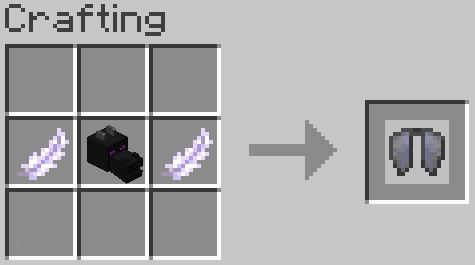
Note: The dragon skulls with the required lore & phantom feather drops will not be available for the first month of the revision to promote road & rail infrastructure construction.
Overworld, The Nether, The End & MapWorld Click to expand
Overworld
The overworld for this revision will be 10,000 x 10,000. After overwhelming feedback we will be keeping Terralith terrain generation! This time we will be using the default terralith biome colours and custom structures! This means there will be new biomes, crazy terrain generation, custom structures and custom trees! (Custom trees can not be re-grown once chopped down, so look after them!)
For more information about Terralith click here.
Ore generation is still vanilla, and the quantities have not been plumped.
Cardinal Roads
This rev we will continue to have the North, East, South & West cardinal roads in the overworld with claim regions pre-created. This is to prevent the claim disputes around the cardinal roads that we have faced in the past.
In order to claim ownership of a cardinal road you will need to run to the world border on the 0 coordinate and be the first to click the sign.
The Nether
This revision’s nether will be a 6000 x 6000 vanilla generated map. The nether spawn area has been left for players to develop. If you would like to take on the task of designing and building the nether spawn hub, make a claim request just as you would in the overworld.
This rev we are trialling a new system for claiming nether cardinal roads & diagonal roads. Similar to the overoworld, the roads will have claim regions pre-made, but the player who finds the pre-placed nether portal in the overworld will automatically gain the rights to the nether cardinal or diagonal road leading to it. If you do not wish to build out that nether road you may transfer ownership to someone else. Padmins reserve the right to re-assign ownership unbuilt or inadequate nether roads. For more details see the Nether Portals section of the info post.
The End
PPGOME, EggyEgg, and Tunfy have custom generated The End this revision. There are plenty of resources to gather spread across islands on this 5000 x 5000 map. You may notice some new & improved custom biomes, with some new mobs spawning!
Dragon Fight
The custom dragonfight will return later this rev, but in the meantime there will be a new method of obtaining elytra. For more details see the Obtaining Elytra section of the info post
MapWorld
Mapworld is bigger than ever! Mapworld has been carried over from rev 31 and we have added even more plots! You can teleport to mapworld from the main building in spawn (The yellow temple). We will be continuing to do some maintenance early rev, but feel free to use map world at any time. Please remember that you must have an empty inventory to enter and leave mapworld. We have placed an enderchest near the entrance for your convenience. We have also added a command to mapworld's exit to automatically clear your inventory.
Claims, Protections & Flags Click to expand
Claims
We are continuing with the claims system we currently have in place. Once you have 4 clearly marked corners /modreq to have a moderator create your claim (remember to include what you would like the claim to be called!). A build-allow region will then be created for your claim, which will allow for everyone to gather resources from the area but also make it clear that someone intends to build in the area. Claims must be rectangles with 4 clearly defined corners, staff will not make oddly shaped claims. If you wish to expand your claim, the new corners must also be marked before requesting. Remember claims do not protect your area, they are meant only to notify players of your intent to build there. If you want to find out if you are currently in a claim, use /rg i. Claims should not be excessively large and, while not required, we recommend a buffer of 3-5 blocks between claims.
Note: Claims must be used within a reasonable timeframe and cannot encompass other claims. You cannot claim the entirety of a 'rare' biome without prior padmin permission. Padmins reserve the right to deny, resize or remove claims.
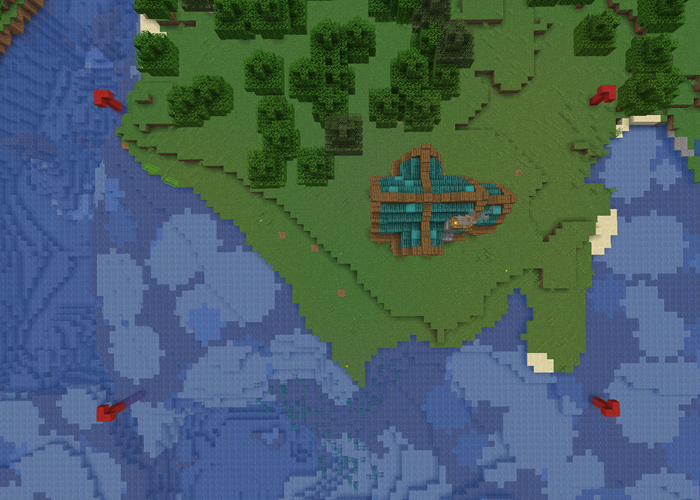
When making your claims, please make sure at least the corners are marked clearly. However, we recommend including signs, a fence or a continuous wall to make it clearer for other players.
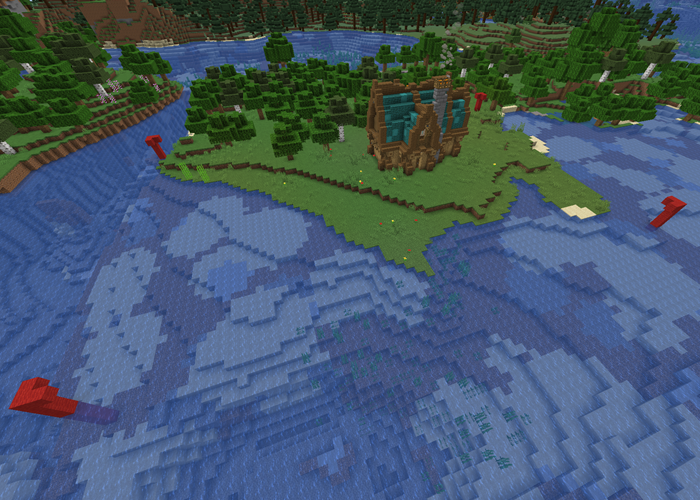 If the claim is larger than the immediate render distance please provide approximate coordinates for the opposite corner to help staff locate it. Do not make claims larger than they need to be.
Note: Claims are meant as a way for players to reserve space for builds before being able to complete and protect that area. The owner(s) of the claim region will be the authority for edits made within that region, up to and including rolling back unwanted edits from players who were not given permission to build in that area. Talking with neighboring players about a conflict is STRONGLY encouraged before requesting help from the moderation team. When needed, moderators and admins will make a reasonable effort to resolve conflicts, but will generally side with the owner of the claim region.
It’s important to note that edits made by neighboring players outside of someone’s claim region are fair game. Moderators and admins can review any concerns for clear griefing behaviors. As an example, a build that serves a purpose, such as building a road towards someone’s claim, even if low quality or low effort, is not automatically griefing. We will do our best to help resolve conflicts, but neighboring builds are not generally subject to removal.
In those cases when edits are made within a claim region without express permission, and if this causes a conflict, this will be defined as griefing even if there was no intent to harass or disrupt others. We ask that players please coordinate and play cooperatively as much as possible, and that includes obtaining clear permission from a region owner to play together.
Protections
Protections will continue to be granted and created under the same policies as previous revisions. Once your build is mostly complete /modreq to ask for protections and a mod will create a region around your completed build. Less complete builds in higher risk areas may be protected to prevent grief. We will NOT protect natural resources or unbuilt areas.
Worldguard Flags
Staff can change some worldguard flags for players regions on request, however, there are some exceptions & rules.
- PVP: PVP regions can only be set by PAdmins. The PVP area must be fully enclosed, be accessed through an iron door & be clearly marked as a PVP area.
- Water & Lava Flow: Water and lava flow can be allowed or denied.
- Greeting Message: Claim greeting messages can be customised by staff. These can be any colour except white, and can not have extra formatting such as bold or underline.
- Vine Growth: Vine growth can be set to deny by staff.
- Enderman Griefing: Enderman griefing can only be set to deny by PAdmins, and ONLY for arena or event builds.
- Trapdoor Use: Trapdoor usage can be denied by staff. However this can only be for decorative trapdoors and not used to lock off areas to other players.
Note: Other flags may be changed upon request at PAdmins discretion.
Note: Claims must be used within a reasonable timeframe and cannot encompass other claims. You cannot claim the entirety of a 'rare' biome without prior padmin permission. Padmins reserve the right to deny, resize or remove claims.
Note: Claims are meant as a way for players to reserve space for builds before being able to complete and protect that area. The owner(s) of the claim region will be the authority for edits made within that region, up to and including rolling back unwanted edits from players who were not given permission to build in that area. Talking with neighboring players about a conflict is STRONGLY encouraged before requesting help from the moderation team. When needed, moderators and admins will make a reasonable effort to resolve conflicts, but will generally side with the owner of the claim region.
It’s important to note that edits made by neighboring players outside of someone’s claim region are fair game. Moderators and admins can review any concerns for clear griefing behaviors. As an example, a build that serves a purpose, such as building a road towards someone’s claim, even if low quality or low effort, is not automatically griefing. We will do our best to help resolve conflicts, but neighboring builds are not generally subject to removal.
In those cases when edits are made within a claim region without express permission, and if this causes a conflict, this will be defined as griefing even if there was no intent to harass or disrupt others. We ask that players please coordinate and play cooperatively as much as possible, and that includes obtaining clear permission from a region owner to play together.
Note: Other flags may be changed upon request at PAdmins discretion.
Livemap Click to expand
We are continuing to use Bluemap this rev. Bluemap allows players to see a top down and 3D carto style view of the world.
From the start of the revision the map will be black & restricted to the top-down view. To unlock parts of the map you will need to generate a map in-game. To do this you will need to fully render an in-game map, then type "/mapfill" while holding it in your hand. The livemap will automatically update shortly after.
After 2 weeks any un-mapped areas and the 3d mode will be unlocked!
Want your town/build added to the live map as a marker? Make a modreq. We will now add more builds and towns to the live map, even if they do not qualify for a /place.
Click here to open the map!
CritterGuard Click to expand
Critterguard is our custom plugin for taming, protecting & managing your mobs/pets!
Below is a quick rundown of what it can do, and how you can do it:
| Creature | Taming Method | Protection Rules |
|---|---|---|
| Horses, Mules & Donkeys | Ride until they love you (vanilla method) | Can only be killed while being ridden. |
| Llamas | Click with a lead | Can only be killed while being ridden. |
| Camels and Happy Ghasts | Ride them once | Can only be killed while being ridden. |
| Wolves, Cats, and Parrots | Use their respective taming items (vanilla method) | Can only be killed by their owner. |
As this is an entirely new plugin, the commands are structured a little different than before. The table below shows the main commands you need to know:
| Command | Description |
|---|---|
| /critter access [add/remove] [full/passenger] [username] | Grant or remove a player's access to a mount. |
| /critter list [entityType] [player] [page] | Get a list of critters based on the specified criteria. |
| /critter gps [name/id] | Get the coordinates of and point your head to a critter you own that matches the specified identifier. |
| /critter notifications [on/off] | Enable/disable mount notifications. |
| /critter untame | Untames a critter... obviously. |
Custom Crafting Recipes Click to expand
We use custom crafting recipes to allow players to get rarer / uncraftable items. The list below shows you the items it is possible to craft & how!
| Item | Custom Crafting Recipe |
|---|---|
| Elytra | 2 "Phantom Feathers" & 1 Dragon head |
| Heart of the sea | 8 "Glistening heart fragments"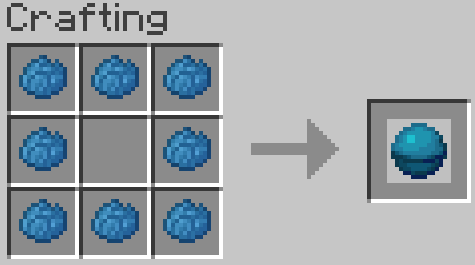 |
| Red sand | Red dye & sand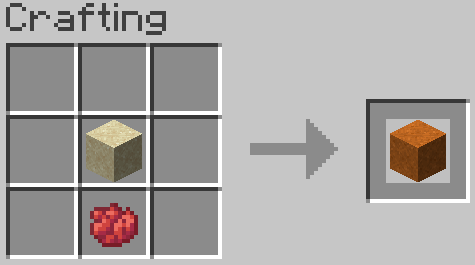 |
| Red sandstone | Red dye & sandstone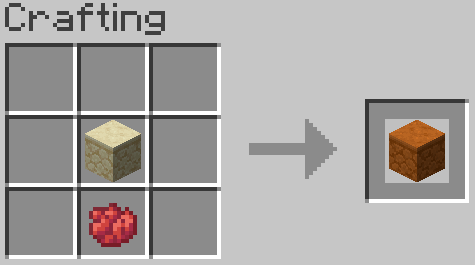 |
| Coral blocks (Works for all coral types) |
9 pieces of coral (not full blocks or fans)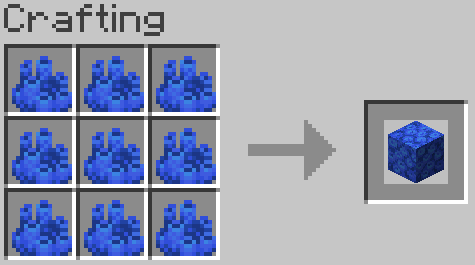 |
| Stackable minecarts (up to 64) | Minimum 5 iron ingots (vanilla recipe)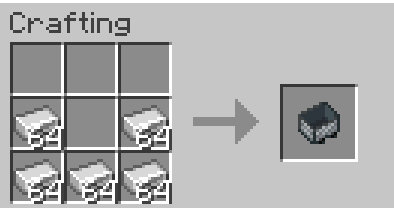 |
The custom "heart of the sea fragment" drops can be obtained by mining large quantities of sand.
Purchasing Easy-Signs Click to expand
Players can now request a limited number of easy signs to be added to their town or event!
This is a great way for towns and builders to add seek and find type events to their builds. or just a great way to give a souvenir to those that visit!
Easy signs requested by players are limited to a few actions:
- Max use 1 - this limits the sign use to once per player
- Give held - this will give 1 item to any player who clicks the sign
For PVP related event gear we will allow the max use to be removed, however the items must have curse of vanishing added to them, and the items given must be iron or lower in quality.
Other requests for easy signs can be proposed to Padmins for consideration. To request a sign you will need to provide the following information and items -
the sign written as you want it to look and waxed (dye and glow are optional) the item you request to be given (see below for more details) 32 Nerd Aura
More information about the items you can give away via an easy sign:
- You must turn in 64 items per easy sign to give away. (or 54 for non-stackable items, using 2 shulkers)
- The item must be named via anvil to EXACTLY how you would like it named for the easy sign
- There will be no text color, lore, or enchants added to the items by padmins, they will be given to the player exactly as you make them in game
- If you are requesting multiple signs for an event, use a book and quill to list the coordinates of each sign and place that at the first location. Then at each sign location place a chest/shulker/or barrel with the items & payment for that sign. This way only one modreq is needed.
Note:
- Max number of signs per player will be set at 20 for now.
- All normal server rules apply (no NSFW, etc)
- Make sure to check how your sign looks in vanilla, as some mods change text size and text will show as cut off for vanilla players
- Padmins reserve the right to deny any sign request
Note:
- Max number of signs per player will be set at 20 for now.
- All normal server rules apply (no NSFW, etc)
- Make sure to check how your sign looks in vanilla, as some mods change text size and text will show as cut off for vanilla players
- Padmins reserve the right to deny any sign request
Nether Portals Click to expand
Pre-placed nether portals
From the start of this revision there will be 9 pre-placed portals. 1 in spawn, and 8 hidden ones around the map! The hidden portals are approximately located in the North, NorthEast, East, SouthEast, South, SouthWest, West & NorthWest areas of the map. The markers for the eight hidden portals will be a sign on a bedrock tower. If you find one of these signs out in the world, punch the sign and it will automatically create a modreq claiming the portal and announce in genchat that you have found a portal. (If multiple players hit the sign, the lowest numbered modreq will be counted as the owner of that portal) The portal frames for preplaced portals must be placed within 2 weeks of the modreq and within 100 blocks of the pillar. These portals will be lit by padmins for free.
You will also automatically gain ownership of the claim region for that portals cardinal or diagonal nether road! If you do not wish to build out that nether road you may transfer ownership to someone else. Padmins reserve the right to re-assign ownership unbuilt or inadequate nether roads.
In summary, to claim & build a hidden portal you will need to:
- You must locate the pre-placed double bedrock block and claim sign.
- Click the sign to claim the portal
- Build an obsidian portal frame anywhere within 100 blocks of the bedrock. (standard 2x3 portal minimum size)
- You may then modreq for the portal to be lit.
- Profit!
Click here to see the list of the found portals!
Note: If a portal has not been placed within two weeks, we will place a default (2x3) portal at the bedrock location (no exceptions).
Individual nether portals
You can buy a portal of your own, once all 8 preplaced portals have been found. The cost of a portal is 32 diamonds and 1 portal shard per portal space, this makes the smallest possible portal (2x3) cost 6 portal shards and 32 diamonds. Portal shards can be purchased at the spawn traders for 16 Nerd Aura each.
Padmins encourage towns near each other to work together to create a portal hub towns can share. Padmins reserve the right to deny portals that may be too close or may interfere with previously placed portals. (Click Here to see a list of the locations of the found portals)
In summary, build your own portal you will need to:
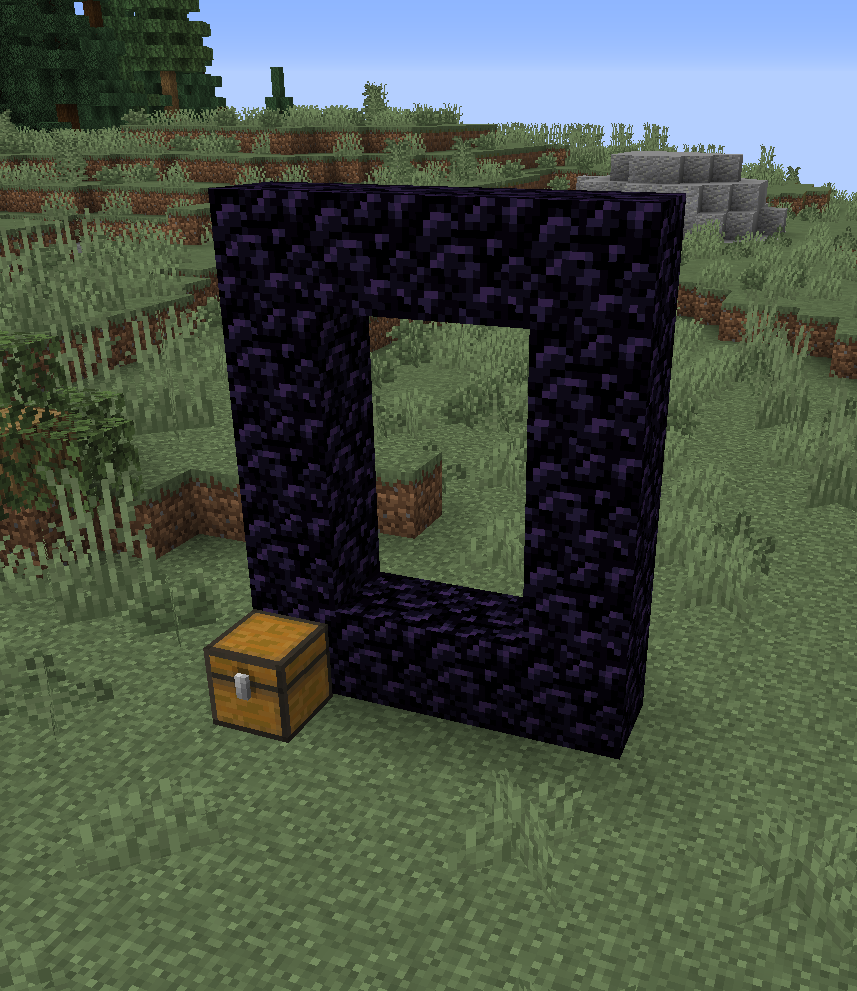
Build your desired portal frame (minimum 2x3 portal as shown in the sceenshot above), then place a chest next to it. DO NOT ATTEMPT TO LIGHT THE PORTAL YOURSELF It will not work.
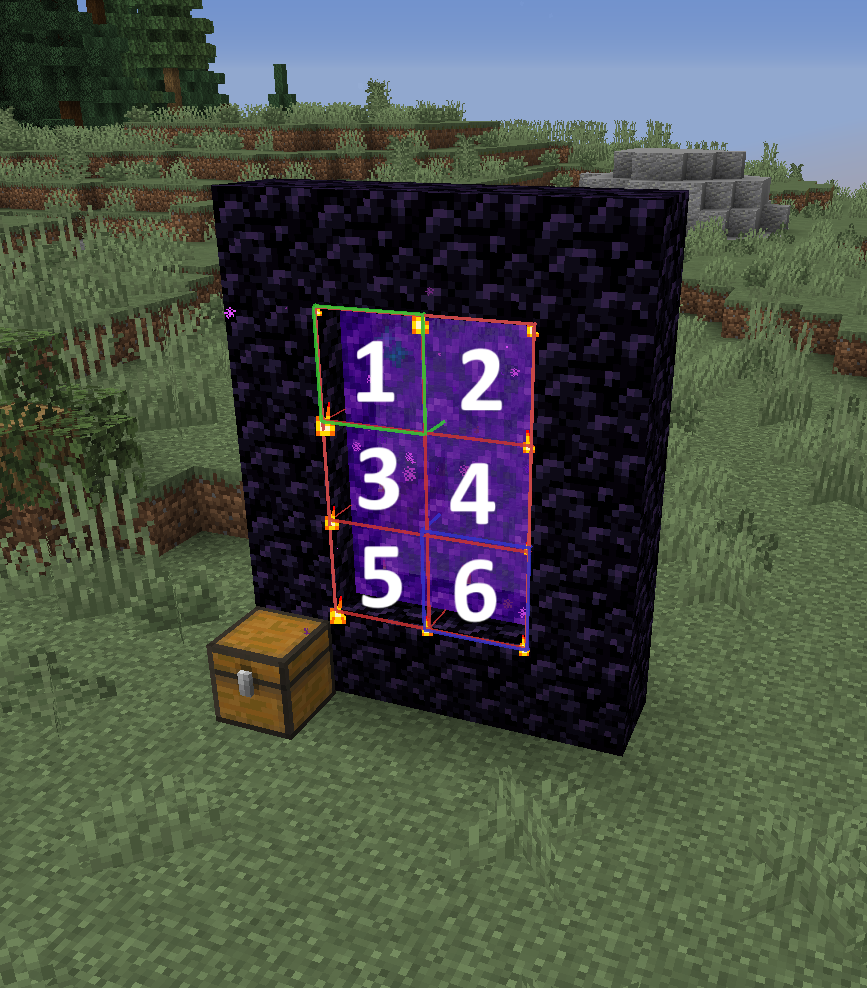
You will then need 32 diamonds & the required number of portal shards to purchase the portal. The minimum sized 2x3 portal in this example will require 6 portal shards as that is how many portal blocks it will require to fill it.
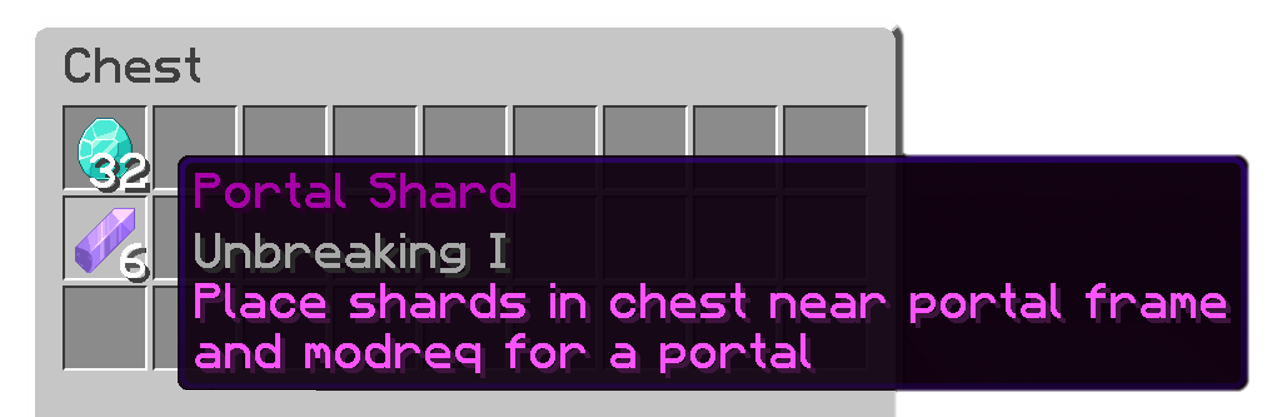
Place the 32 diamonds & the correct number of portal shards in the chest. Then /modreq for your portal to be lit. Make sure youre standing next to your portal when making the modreq, and remember to let us know what you want the portal to be called for its /place and livemap markers!
Note: If a portal has not been placed within two weeks, we will place a default (2x3) portal at the bedrock location (no exceptions).
Build your desired portal frame (minimum 2x3 portal as shown in the sceenshot above), then place a chest next to it. DO NOT ATTEMPT TO LIGHT THE PORTAL YOURSELF It will not work.
You will then need 32 diamonds & the required number of portal shards to purchase the portal. The minimum sized 2x3 portal in this example will require 6 portal shards as that is how many portal blocks it will require to fill it.
Place the 32 diamonds & the correct number of portal shards in the chest. Then /modreq for your portal to be lit. Make sure youre standing next to your portal when making the modreq, and remember to let us know what you want the portal to be called for its /place and livemap markers!
Redstone Click to expand
Vanilla hopper speeds are back! This rev we have made many optimisations which will allow us to remove the limits on hopper speed that have been in place in previous revs.
Redstone guidelines
- Redstone clocks must have an off switch (or switch off automatically when not in use)
- Hoppers should be used conservatively (no large hopper chains or auto-sorters)
- No redstone contraptions of excessive size or complexity
Note:
We reserve the right to introduce restrictions including but not limited to: lowered hopper speeds, villager ai lobotomisations, making changes to player redstone contraptions if server lag requires it.
Note:
We reserve the right to introduce restrictions including but not limited to: lowered hopper speeds, villager ai lobotomisations, making changes to player redstone contraptions if server lag requires it.
Spawn Click to expand
Revision 32’s spawn theme was chosen by ghrey303 and designed and built by ghrey303 with sprucing done by the padmins and the moderation team. We hope you enjoy this enchanted setting!
Once again we have spawn secrets hidden by staff. Just little easter eggs with a collectible reward. Make sure you explore every nook and cranny of spawn!
Separate spawn challenges return once again this rev. These are skill or luck based challenges such as parkour, mazes and quizes. Make sure to visit the challenge tower to check them out. Be sure to stop by throughout the rev to check for new additions!
Note: We have opted not to include a rail station in this revisions overworld spawn due to low usage. However, please reach out to the padmin team for any under-spawn needs.
Note: We have opted not to include a rail station in this revisions overworld spawn due to low usage. However, please reach out to the padmin team for any under-spawn needs.
Doppelgangers Click to expand
Doppelgangers (known as "Doppels" for short) are a way to obtain specific player heads. There are 2 types of doppel, PAdmin & non-PAdmin. See the guide below to learn how to create each type.
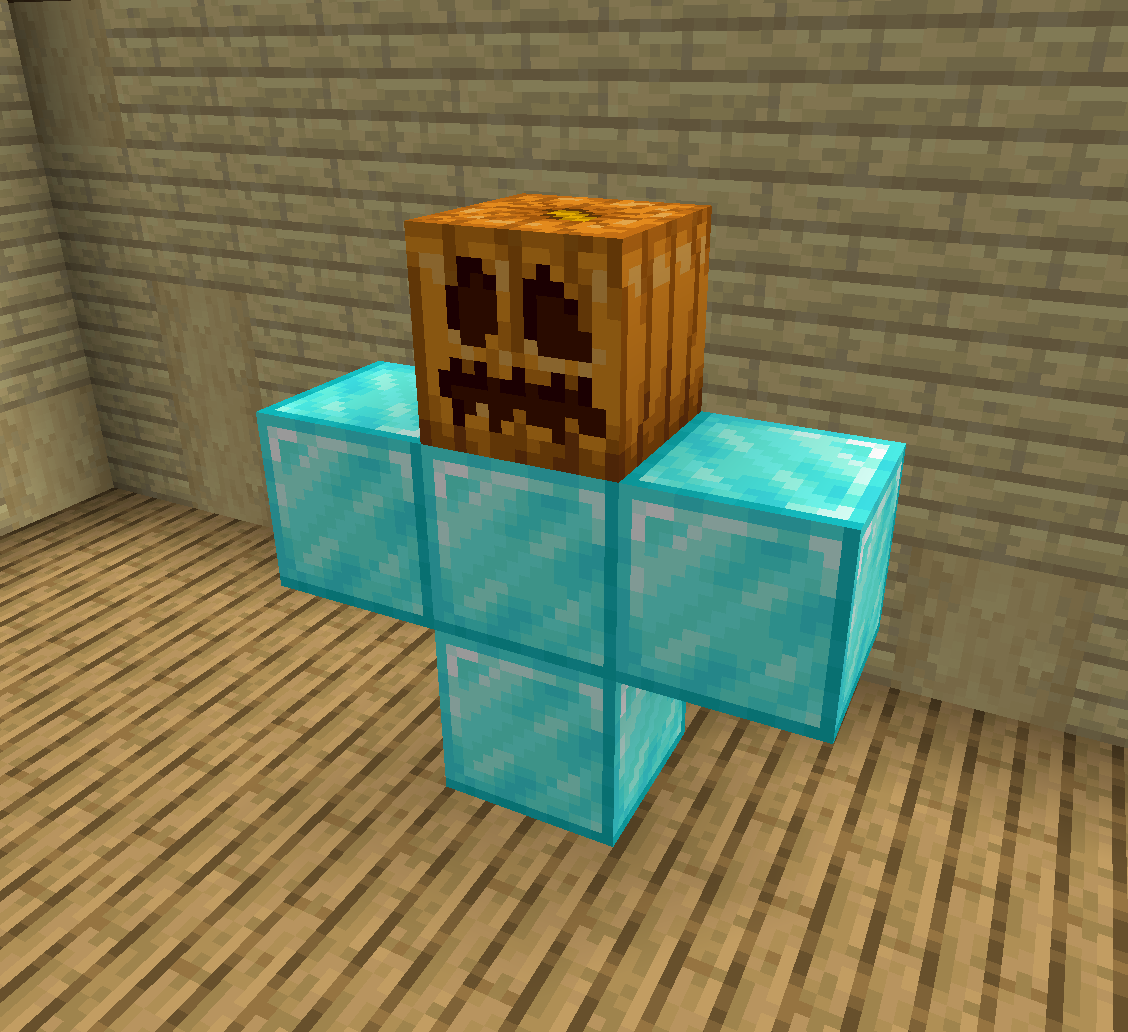
PAdmin doppels are created by placing 4 diamond blocks in a T shape with a named carved pumpkin on top. PAdmin usernames are cujobear, cheezychicken, ghrey303, Spook6 & TemporarilyAlive. (usernames are case sensative!) Which name you choose is up to you! Upon placing the named carved pumpkin 5 doppels will spawn (one for each PAdmin). Upon defeating the final doppel the Head will drop.
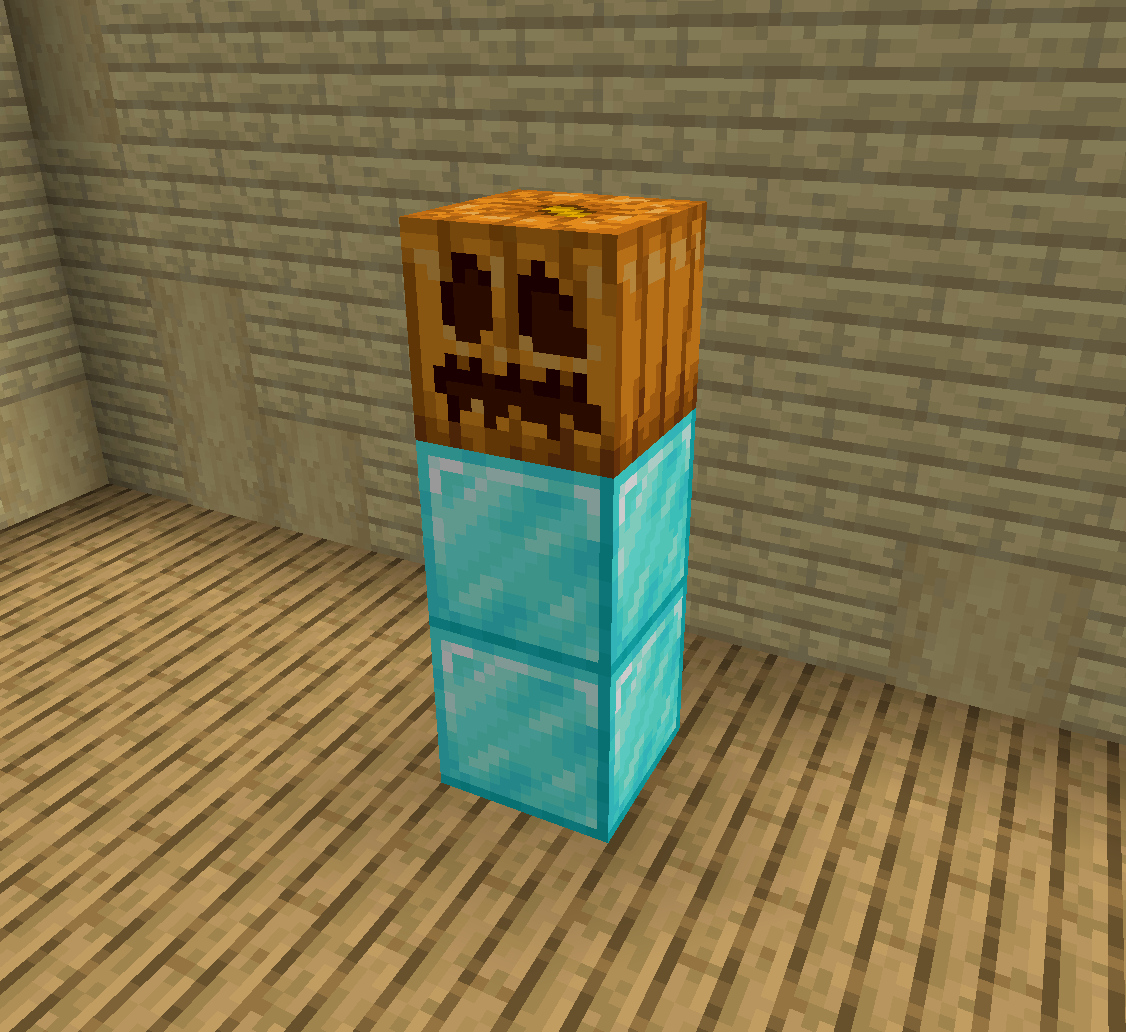
Regular doppels are created by placing a named carved pumpkin on top of 2 diamond blocks. Carved pumpkins should be named using an anvil (usernames are case sensative!). Upon placing the named carved pumpkin the doppel of that player will spawn. Upon defeating it the head will drop.
Note: Doppels require 1 block air gap around each side & above to be able to spawn.
WARNING: Doppels are extremely dangerous. Items lost to doppel related deaths will not be refunded.
It is strongly recommended to build doppels in a safe and enclosed area to prevent escapes.
Note: Doppels require 1 block air gap around each side & above to be able to spawn.
WARNING: Doppels are extremely dangerous. Items lost to doppel related deaths will not be refunded.
It is strongly recommended to build doppels in a safe and enclosed area to prevent escapes.
HeadMart & Microblocks Click to expand
HeadMart
For Rev 32 we will continue to use Headmart as before, but now you will no longer need to purchase Custom Skull Tokens from the traders at spawn. Headmart will now accept the standard rev currency (Nerd Aura). Head prices have also been reduced so will now cost 8 Nerd Aura per head. Once you have enough Nerd Aura held in your hand type /headmart to open the shop. A menu will pop up and you can browse through categories or search by clicking the compass. Do not click on a skull until you are ready to purchase it. If you would like to see a skull before buying, we suggest you hop over to the Creative server which is also running this plugin. You can also search the website https://minecraft-heads.com.
Warning
Padmins will not refund any purchases.
Microblocks
We will be continuing the usual Microblocks Collection through Wandering Traders. We have added many new blocks from the newest updates, so keep an eye out for those! This collection will be just for fun and no rewards will be given for collecting them all. Microblocks will also keep the same price of 1 diamond and 1 block.
Warning
Padmins will not refund any purchases.
Weekly Events Click to expand
When we created the weekly events we were hoping to encourage more player run games with staff in attendance to help out. Over the last few revs it has come down to staff running the events each weekend. While we have the regular event times (Friday Night @ 7:30pm Eastern and again on Saturday @ 1pm Eastern) we encourage players to develop and host games at other times as well. To host an event make a modreq and a padmin will contact you for more information. Arena builders will be given 3 event tokens for building the arena and 3 extra tokens if they host the event.
This rev we are making a small change to event tokens from weekly events. Participants at the weekly events will still earn a collectible & winners will be given trophies, however there will now be 3 possible event tokens every weekend!
There will now be 1 event token sign (somewhere obvious and not hidden), and a participation token for each day of the event.
Here is what an Event Token looks like:

Hidden Builds Click to expand
Every rev we hide pre-made builds in-keeping with the revs theme. This rev that theme is magical moments! There are 28 pre-placed builds from contest winners including; buzzie71, Chef_Zuul, cujobear, Emizzon, fazaden, J4bble, Killo222, King_of_queso, Muskogee_Red, NastyHabits, NolleReal, OleToothless, Omega_Orion, papilexiii, PlNG, Stepson_of_Evil, TheArylon, Za_Zaa & Zongsoe. Find a build and hunt for a sign to collect your prizes!
Spawners & Grinders Click to expand
Spawners & Grinders
While private farms/grinders are not in the spirit of PvE, we will be continuing with the established policies. You can set your vanilla mob (zombie, skeleton, spider) or iron golem grinder to be private and you do not need to share any of the drops (please add a sign stating it is a private farm). The exception to this rule will continue to be for guardian grinders and blaze grinders which must remain 100% public at all times. We also encourage nether gold farms and bartering markets to be kept public.
Note: This revision we will not be including custom spawners from the start of the rev, however padmins do reserve the right to possibly add custom spawners later in the revision or as event prizes.
Iron Golem Spawners
With the relative ease that high speed golem grinders can now be created, we will continue allowing players to create their own vanilla golem grinders. Please be efficient with your villager usage and don’t use too many. The PAdmins reserve the right to convert any and all golem grinders to spawners if it is deemed that they are causing excessive lag.
Note: This revision we will not be including custom spawners from the start of the rev, however padmins do reserve the right to possibly add custom spawners later in the revision or as event prizes.
Rev 32 Info Post V1 by TemporarilyAlive
Posted by TemporarilyAlive on Oct. 1, 2026 in PvE
 Mobs that look suspicious will have a circle of flames spinning around them. These are the mobs that you'll want to kill in case they're aliens!